How to Customize Your Cardkive Memory Book: Photos, Covers, Multiple Boxes, and More
You've packed up the card box from the venue, emptied the drawer that never quite closes, and added the stack your mother-in-law handed you in a rubber band. Before you seal the box and send it off, you may be asking: Can I truly make this book my own, or does it just come out however Cardkive decides?
Good news. A Cardkive memory book is built around your choices, not a fixed template. We've included a level of personalization that takes it from a generic photo book to a memory book that could only be yours. Let's dive in and give you some real answers to the questions we hear most before a customer hits "order."
Can You Add Photos to Your Cardkive Memory Book?

Yes, and this is the number one question we get. If you are purchasing our Wedding Cards Book, this option is included with your purchase. It can also be easily added to the Classic Greeting Cards Box order. The goal is to give you a memory book that perfectly captures your experience. Add a photo from the altar that can be across from the card your childhood pastor gave you. Or, a candid photo from the reception that comes before all the cards from your bridal party.
One customer, Tori Teto, put it this way after ordering her wedding book: "When the preview was ready, I was able to choose my own cover, title, and reorder the pages if I wanted to! There were even options to add text to the pages if I wanted." That's the level of control we're talking about. Your book, your story, told the way you remember it.
Customizing Your Cardkive Cover

The cover is the first thing anyone sees when your book lands on the coffee table, so it makes sense that people want a say in it. With a custom cover, you can choose the design and add a title to personalize it with names or a date. A wedding card book might read "The Smiths, 2026." A baby book might carry your child's name and birth date instead.
This isn't an afterthought tacked onto the process. You'll see a full preview before anything is printed, so you can adjust the title, swap the layout, or change your mind entirely before it goes to print.
Ordering Multiple Boxes for Large Collections

If you're the type who saved every card from your bridal shower through your first anniversary, one box might not cut it. That's fine. You can absolutely send multiple boxes and have them either combined into a single memory book or split into separate volumes by occasion. In fact, because of this, we added the Double Cards Box to our list of offerings.
Big collections are actually one of the reasons people come to us in the first place. A shoebox of wedding cards might be manageable. A shoebox plus a bin plus the pile still living in a kitchen drawer is a different story, and it's exactly what a keepsake box was never built to hold these for the long haul.
Beyond Greeting Cards: Invitations, Save-the-Dates, and Programs
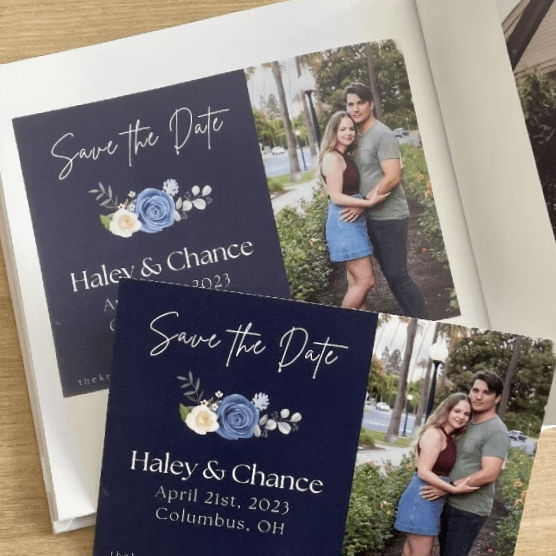
Cards aren't the only thing worth preserving. Because we digitize everything through high-resolution photography rather than a flatbed scanner, we can capture more than the standard greeting card. Wedding invitations, save-the-dates, ceremony programs, and even 3D cards can all go into the same book.
That matters if you want your memory book to tell the full story of an event. Send in the invitation alongside the cards to give your book the perfect encapsulation of the timeline of events.
Organizing by Event or Chronologically: Your Choice
Some people want their book to move in the order things happened. Others prefer it grouped by event. Both options are fine, but it helps to do a little front-end organization. If you're combining cards from several occasions into one box, pre-sorting by your groups tends to keep the story clearer. It can be as simple as placing labeled sticky notes between card groups. Some patrons choose to sort sets into plastic baggies.
However you decide to organize them, our team will photograph and catalog them by the labels you designate. Keep in mind, you also have the option to reorganize pages during the review phase within our book builder.
How to Order Your Cardkive Book

The process starts with a box. Once you order one, it will arrive directly at your door. Fill it up with your cards (and any invitations, programs, or cardstock items you want included), and send it back. From there, our team photographs everything, builds the layout, and sends you the digital proof for review. This is when you'll get the chance to adjust the order, edit the cover, or add any additional photos before anything is finalized.
You'll also walk away with digital files of everything we photograph, so the book isn't the only place your memories live. If you want to share memorable words at a family gathering or if a relative wants a copy, you've got it saved and ready to share.
A Cardkive book should look like it belongs to you, not like it came off a shelf. If you've been holding onto a box of cards and wondering whether the end result would actually feel personal, don't worry - it will.


Comments